How do passkeys work?
What’s in it for you?
Are there any gotchas?
Short answer
Passkey authenticators work somewhat similarly to password managers.
Passkeys relieve you of the duty to remember multiple passwords. You don’t even need to type one.
People who don’t use password managers or federated authentication will benefit from passkeys the most.
You need a recovery plan in case your authenticator is lost.
Long answer
Let me gradually introduce you to the concept by comparison.
Too many passwords problem
It all begins with a simple password – strong authentication method, which is also easy to implement. It became so widespread that it started to suffer from its popularity.
When you have too many passwords to remember, you will:
- generate easy-to-remember passwords
- reuse the same password on multiple sites
- create a pattern
It is not a question of “If” – it is a question of “When”. Some people will start doing that at 20 passwords, others will do it above 100. Easy-to-remember passwords are not a solution – they merely delay the inevitable.
Reuse of passwords on multiple sites is a big problem. If you chose the same password for AshleyMadison as for your Internet Bank, chances are that hackers know your Internet Bank password. The same story goes for password patterns. If the cracked password is “ashleymadison.com-password”, then the attackers can guess that your bank password is “bigbank.com-password”.
Existing solution – password manager
Password managers aim at solving the “too many passwords” problem. An authenticating application is introduced into the architecture. It can store all your passwords on a device, in a de-centralised manner like Password Safe, or KeepAss. Alternatively, it can store your passwords centrally in the cloud, like 1Password or Bitwarden.
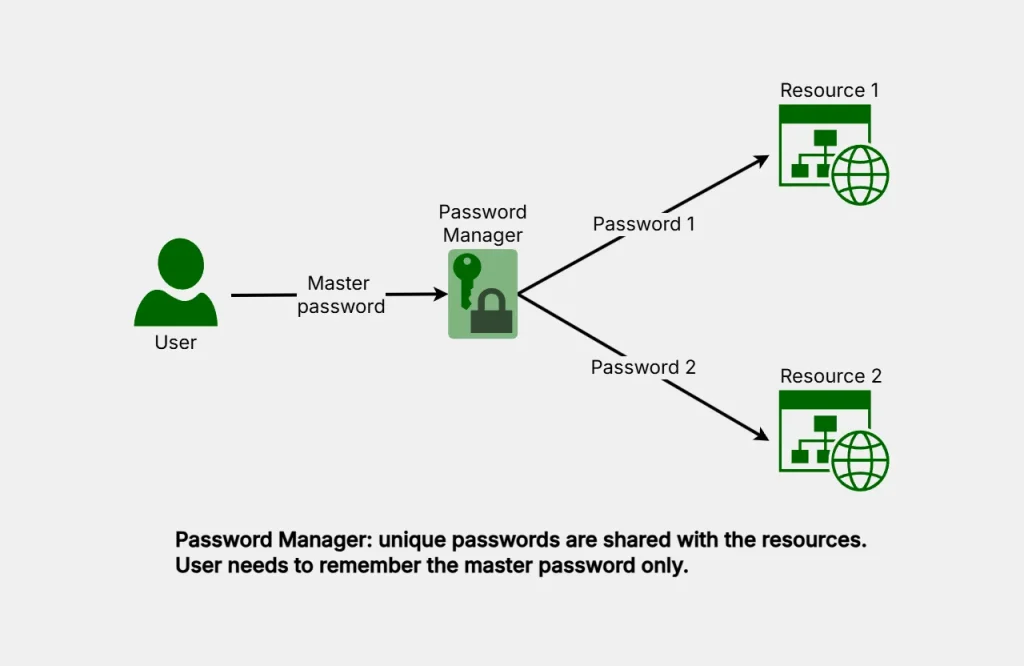
A password manager generates unique, strong passwords for each site and stores them in one place – vault. You authenticate to the vault with the only password you need to remember, and then it will let you access all other unique passwords, which you don’t need to remember.
Existing solution – federated authentication
Federated authentication is also a well-known solution to the problem of too many passwords. Instead of resources authenticating users directly, a broker (Identity Provider or Active Directory) is introduced into the architecture. The user authenticates with the broker, obtains the unique token, and presents the token to the resource. Resource verifies user authentication with the broker via token validation. Users manage only one password, and that password is never shared with the resource. So even if the resource is compromised, the user password is safe.
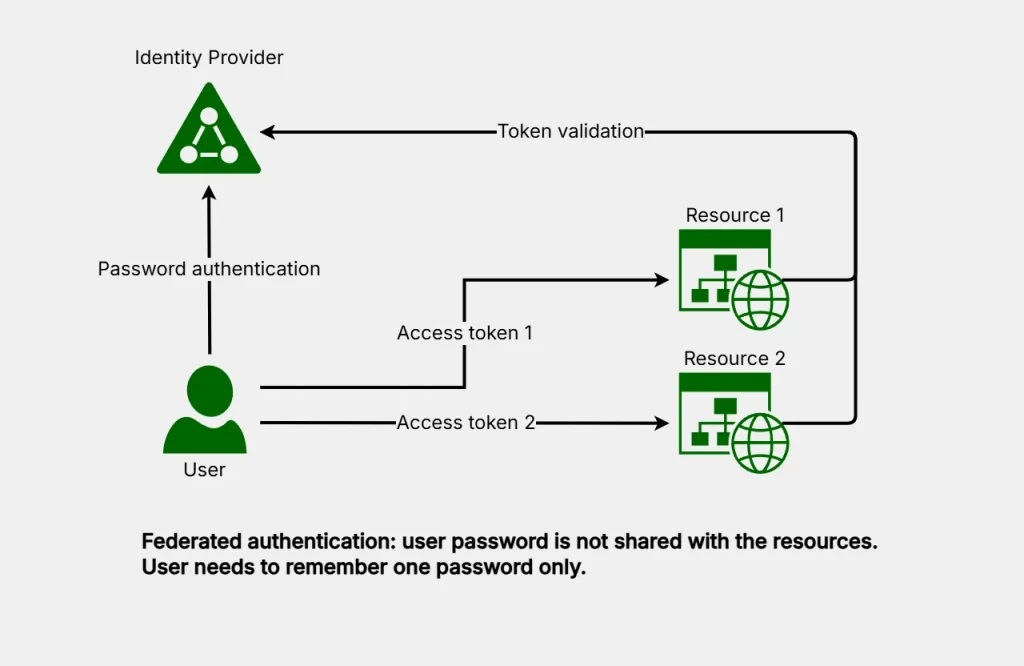
Corporate environments widely use this architecture. It solves the password reuse problem, and that is why passkeys are not popular in the enterprise yet.
Outside of the corporate environment, some web resources employ the same approach, which allows you to “authenticate via Google” or “authenticate via Facebook”, for example. Google and Facebook would be your identity providers in this case, and you would not need to create an additional resource password.
New solution – passkeys
“Passkeys are an easier and more secure alternative to passwords. They let you sign in with just your fingerprint, face scan or screen lock” – Google’s definition.
Like password manager – “authenticator” is added to the architecture. It can be special software, a device, or even an existing password manager that could be rigged to handle passkeys.
Like password managers – authenticators can store passkeys on a single device only, or sync them across multiple devices. Passkeys synchronisation process is more complex, though.
Unlike password managers, passkey authenticators generate public/private cryptographic keys instead of passwords. The public key is stored with the resource, and when the user needs to authenticate, a challenge is sent to the authenticator. User authenticates to the authenticator, authenticator digitally signs the challenge, which is then verified by the resource. If the signature is correct, the user is admitted to the resource.

If the attacker intercepts the signed attestation, they cannot re-use it for another website, or even another session on the same website. That makes passkeys more resistant to phishing.
To be fair, in-browser password managers also implement phishing resistance. Because they “see” the user session – they do not allow entering the password to a similar-looking phishing website. De-centralised password managers are usually outside of the browser and they don’t offer the same protection. They are resistant to vendor breaches, though.
Like password managers and federated authentication – passkeys solve the problem of too many passwords. They also introduce a way to access your vault via biometrics. That is a big selling point for many people. Less typing, faster access. Personally, I would never use biometrics as an authentication factor. You can knock me down, cut my fingers or take a scan of my face. You can do that without my permission. You would never get my password unless I let you, or you trick me, though.
Convenience of biometric authentication may also attract less security-savvy, or risk-optimistic people, who don’t use password managers or federated authentication. They will get the benefit of phishing-resistant, reuse-resistant authentication, and that is a huge improvement. For most people, the risk of a biometric attack is lower than the risk of password re-use and so adoption of passkeys is a net-positive security trend.
Gotchas
The authenticator vault contains your keys, and it needs to be protected from loss. Recovery mechanism is vendor-dependant – some authenticators have cloud backup to allow recovery via escrow or recovery code. Others are device-only vaults with no easy fall-back. Pay attention, research and make sure you have a recovery plan before adopting passkeys for critical applications. In the worst-case scenario – good old password is still available. Don’t throw that one out yet.
Another potential drawback of passkeys is vendor lock-in. At the moment, passkeys are not copyable across vendors. That may change in future.